Head-Up Display Bracket Replacement
Removal Procedure
- Disable the SIR system. SIR Disabling and Enabling
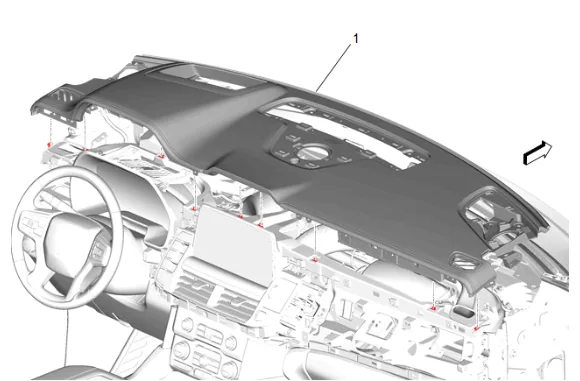
- Instrument Panel Upper Trim Panel (1) » Remove — Instrument Panel Upper Trim Panel Removal and Installation
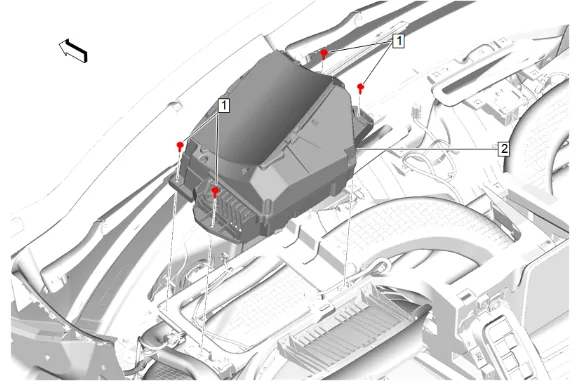
- Head-Up Display Bolt (1) » Remove [4x]
- Disconnect the electrical connector.
- Head-Up Display (2) » Remove
-
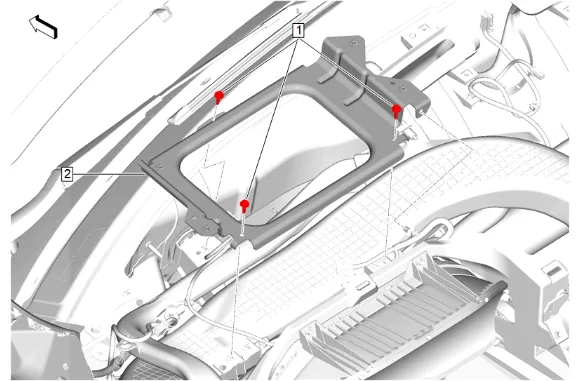
Head-Up Display Bracket Bolt (1) » Remove [3x]
-
Disconnect and reposition harness as necessary.
-
Head-Up Display Bracket (2) » Remove Installation Procedure
-
Head-Up Display Bracket (2) » Install
-
Connect and position the wiring harness.
-
Head-Up Display Bracket Bolt (1) » Install and tighten [3x] — Fastener Specifications
-
Connect the electrical connector.
-
Head-Up Display (2) » Install
-
Head-Up Display Bolt (1) » Install and tighten [4x] — Fastener Specifications
-
Instrument Panel Upper Trim Panel (1) » Install — Instrument Panel Upper Trim Panel Removal and Installation
-
Enable the SIR System. SIR Disabling and Enabling