Front Output Shaft Drive Sprocket Bearing Replacement
Special Tools DT-48211 Drive Sprocket Bearing Installer J-8092 Universal Driver J-35512 Inner Pinion Bearing Installer Equivalent regional tools: Special Tools Removal Procedure
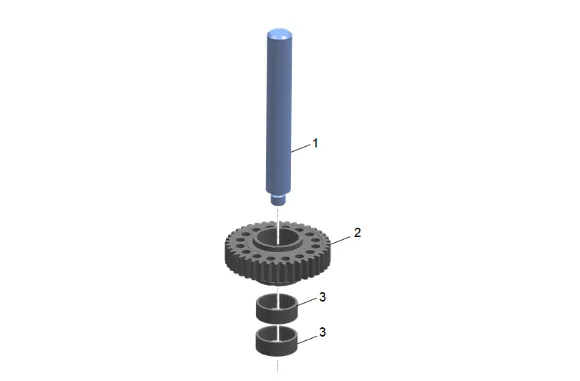
- Using the J-8092 Universal Driver (1) and an arbor press, remove the bearing assemblies (3) from the drive sprocket (2). Installation Procedure
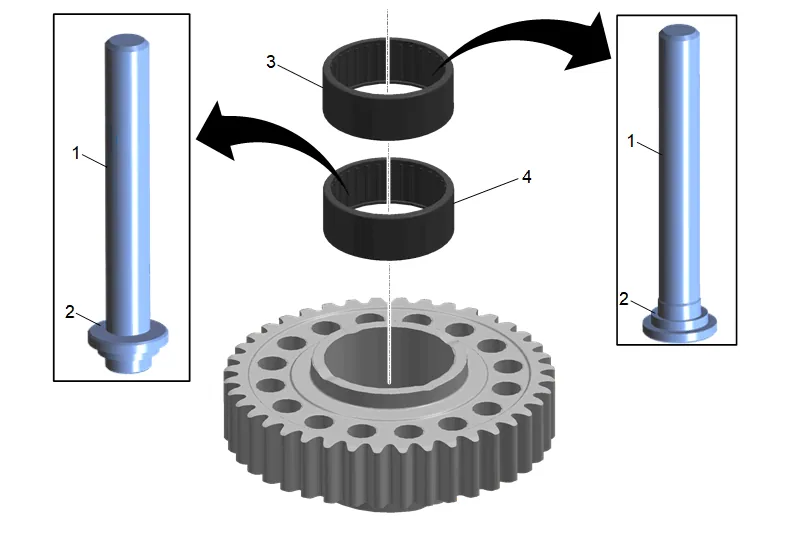
- Transfer Case Front Output Shaft Drive Sprocket Bearing - Front (4) 1.1. Install the bearing using the J-8092 Universal Driver (1) and DT-48211 bearing installer (2). 1.2. Ensure the flat edge of the bearing is facing upward. 1.3. Using an arbor press or hammer, install the bearing until the tool bottoms on the drive sprocket.
- Transfer Case Front Output Shaft Drive Sprocket Bearing Assembly – Rear (3) 2.1. Install the bearing using the J-8092 Universal Driver (1) and DT-48211 Drive Sprocket Bearing Installer (2). 2.2. Ensure the flat edge of the bearing is facing upward. 2.3. Using an arbor press or hammer, install the bearing until the tool bottoms on the drive sprocket.