Charge Air Cooling System Pressure Cap Testing (LM2)
Special Tools EN-24460-A Cooling System Pressure Tester GE-46143-A Cooling System Adapter Equivalent regional tools: Special Tools
- Remove the charge air cooler coolant filler cap.
- Wash the charge air cooler coolant filler cap sealing surface with water.
- Lubricate GE-46143-A Cooling System Adapter and pressure cap O-rings with coolant and press cap to seat O-ring on GE-46143-A Cooling System Adapter before turning to engage threads. Adhesives, Fluids, Lubricants, and Sealers
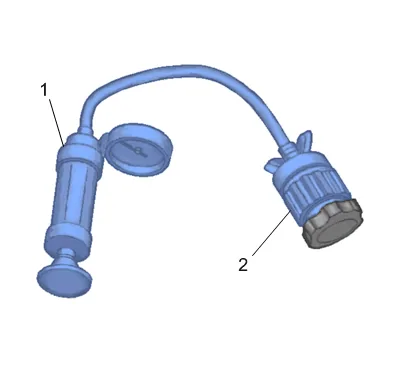
- Use the EN-24460-A cooling system pressure tester (1) with GE-46143-A Cooling System Adapter (2) in order to test the pressure cap.
- Test the pressure cap for the following conditions: Pressure release when the EN-24460-A cooling system pressure tester exceeds the pressure rating of the pressure cap. Maintain the rated pressure for at least 10 seconds. Note the rate of pressure loss.
- Replace the pressure cap under the following conditions: The pressure cap does not release pressure which exceeds the rated pressure of the cap. The pressure cap does not hold the rated pressure.