Battery Negative Cable Disconnection and Connection (9C1, 5W4)
Battery Negative Cable Disconnection and Connection (9C1, 5W4) Removal Procedure
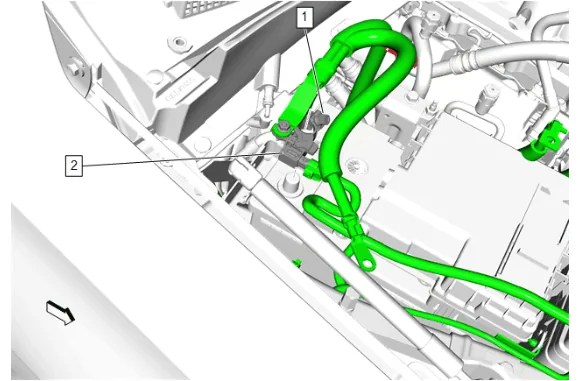
- Battery Post Negative Cable Clamp Nut (1) » Loosen
- Battery Monitor Module (2) » Reposition away
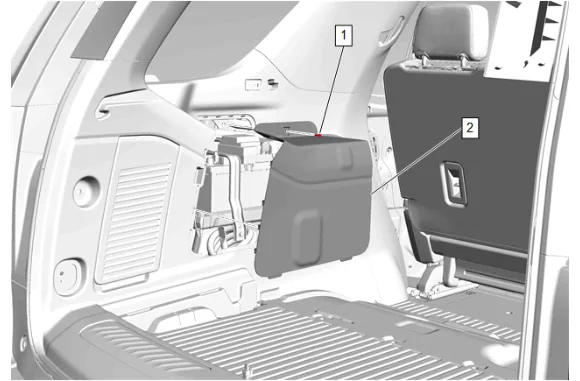
- Quarter Upper Trim Panel Bolt (1) » Remove
- Quarter Trim Panel Cover (2) » Remove
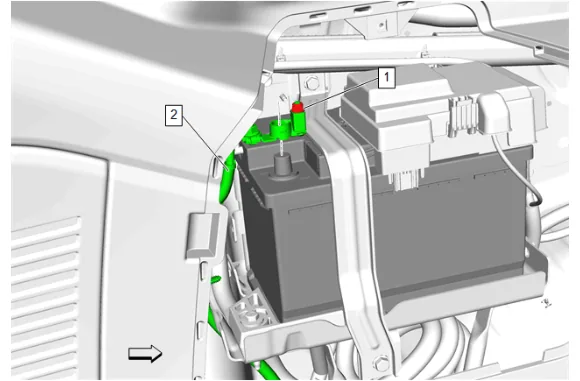
-
Battery Negative Post Clamp Nut (1) » Loosen
-
Battery Negative Cable (2) » Reposition away Installation Procedure
-
Battery Negative Cable (2) » Install
-
Battery Negative Post Clamp Nut (1) » Tighten — Fastener Specifications
-
Quarter Trim Panel Cover (2) » Install
-
Quarter Upper Trim Panel Bolt (1) » Install and tighten — Fastener Specifications
-
Battery Monitor Module (2) » Install
-
Battery Post Negative Cable Clamp Nut (1) » Tighten — Fastener Specifications